History of iOS: From The First iPhone in 2007 to iOS 18 in 2024 – Full Timeline
Interdection:History of iOS: Introduction – I Was There When It Started
The History of iOS is basically the history of how we all got addicted to our phones.
Let me take you back. 2007. I was in school. My phone was a Nokia with buttons. If you wanted to go online you had to wait forever.
Then one day I saw Steve Jobs on YouTube. Black shirt. Jeans. And he was pinching a map on a glass screen.
I thought it was fake.
That phone ran iPhone OS. Nobody called it iOS yet. That name came 3 years later.
Today it’s 2024. I’m typing this on iOS 18. It has AI built in. It can edit my photos. It can write emails for me.
The History of iOS is 17 years long. 18 major versions. And it changed everything.
So let’s talk about it. Not like a textbook. Like two friends talking.
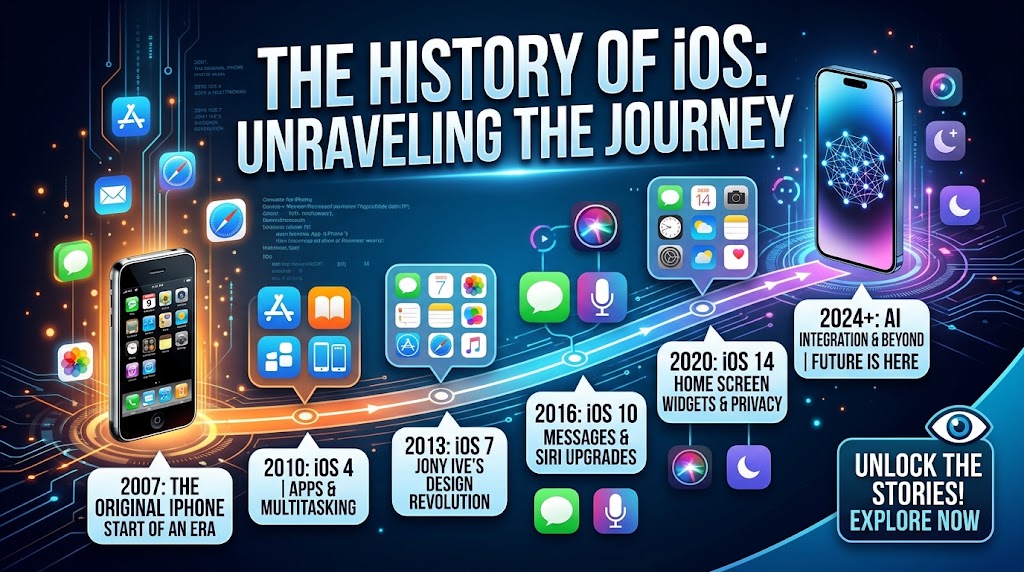
History of iOS: iPhone OS 1 – 2007
The Phone That Had Nothing
The History of iOS starts on June 29, 2007.
The first iPhone went on sale. $499. And people stood in line for it.
The software didn’t even have a version number. It was just “iPhone OS”.
Apple took Mac OS X and shrunk it until it fit in your pocket.
Here’s what you got: Phone. Mail. Safari. iPod. Photos. Camera. YouTube. Maps. Stocks. Weather. Calendar. Notes.
That was it. 16 apps.
Safari was the crazy part. You could pinch to zoom. In 2007 that felt like the future.
But you couldn’t download anything. No App Store.
You couldn’t copy text. You couldn’t send a picture in a text. You couldn’t change the wallpaper.
Still, when you held it, every other phone felt old.
That’s how the History of iOS began.
History of iOS: iPhone OS 2 – 2008
The Day The App Store Opened
If you ask me what’s the most important day in the History of iOS, it’s July 10, 2008.
That’s when the App Store opened.
Apple released iPhone OS 2 with the iPhone 3G.
On day one there were 500 apps. I downloaded “Super Monkey Ball” and played it for 4 hours straight.
Suddenly anyone could make an app. Anyone could download it.
The iPhone stopped being a phone. It became a computer in your pocket.
Apple also added push notifications. They were very basic.
And they added Microsoft Exchange. So companies could finally give iPhones to workers.
This update made the History of iOS what it is today.
iPhone OS 3 – 2009
We Waited 2 Years For Copy Paste
2009. People were mad.
“Why can’t I copy and paste?”
Apple finally listened. iPhone OS 3 added it.
They also added MMS. Before this, if you wanted to send a photo you had to email it.
Spotlight search came. Swipe right and search everything.
Landscape keyboard came to Mail.
The History of iOS was adding the basics, one by one.
History of iOS: iOS 4 – 2010
Multitasking and The Name Change
2010. The iPad launched.
Now Apple had iPhone, iPad, iPod Touch. All running the same thing.
So they dropped “iPhone OS” and just called it iOS. This was version 4.
And they added multitasking. Double tap the home button.
Folders came too. Finally I could clean my home screen.
FaceTime launched. I called my cousin and we just laughed for 10 minutes.
You could also set a wallpaper.
The History of iOS felt like a real OS now.
iOS 5 – 2011
iCloud and Siri
October 2011. Apple made a big claim.
“You don’t need a computer anymore.”
iCloud launched. It backed up your phone every night.
Notification Center arrived. No more popups ruining what you were doing.
iMessage was born. Blue bubbles. Free texting.
And Siri. Oh man, Siri.
The first time I used Siri I asked “what’s the meaning of life” and she gave me some weird answer.
The History of iOS got a voice this year.
iOS 6 – 2012
The Apple Maps Disaster
This one was bad.
Apple removed Google Maps and YouTube.
They put in Apple Maps. And it was terrible.
The maps were wrong. The 3D looked melted.
Tim Cook actually wrote a letter saying sorry. That never happens.
They did add Passbook for boarding passes.
Siri got a little smarter.
In the History of iOS, this was the low point.
History of iOS: iOS 7 – 2013
They Redesigned Everything
Steve Jobs was gone. Jony Ive was in charge.
And he hated all the fake stuff. No more leather in Calendar. No more paper in Notes.
iOS 7 was flat. White. Colorful. Lots of blur.
Half the people said “Apple ruined it”. Half said “this looks amazing”.
Control Center came. Swipe up for flashlight. Finally.
AirDrop let you send photos to friends.
Apps updated automatically.
The History of iOS looked brand new.
iQS 8 – 2014
Apple Lets Developers In
2014. Apple opened the gates.
You could install third party keyboards. SwiftKey came to iPhone.
The Health app launched.
Continuity was huge. Answer iPhone calls on your Mac.
Handoff let you start an email on phone and finish on computer.
Apple Pay also started.
The History of iOS became connected.
iOS 9 – 2015
Speed Over Everything
iOS 8 was slow and buggy.
So Apple spent a year just making things faster.
My iPhone 4S felt new again.
Low Power Mode gave you 3 extra hours of battery.
Siri became proactive. She would suggest things.
The News app replaced Newsstand.
In the History of iOS, this was the “boring but important” update.
iOS 10 – 2016
iMessage Gets Weird
“Slide to unlock” was gone.
Widgets moved to the left of the home screen.
iMessage became a platform. Stickers. Games. Money.
You could send messages with big text, small text, invisible ink.
Siri was opened to developers.
The History of iOS started feeling fun.
iOS 11 – 2017
iPad Tries To Be A Computer
This update was really for iPad.
Apple added a Dock like Mac. Drag and drop. A Files app.
ARKit launched. You could put a virtual couch in your living room.
iPhone X came with Face ID and Animoji.
Control Center was redesigned again.
The History of iOS was getting ambitious.
iOS 12 – 2018
Fixing The Mess
iOS 11 had bugs.
So version 12 was all about performance. Apps opened 40% faster.
Apple added Screen Time. It showed you how much time you waste.
I was embarrassed by my numbers.
Memoji launched. Group FaceTime supported 32 people.
The History of iOS became stable again.
History of iOS: iOS 13 – 2019
Dark Mode
We asked for 5 years.
Apple finally gave us Dark Mode.
It looked amazing on OLED screens.
“Sign in with Apple” launched for privacy.
Apps became smaller to download.
The iPad split off as iPadOS.
The History of iOS grew up.
iOS 14 – 2020
Widgets
Biggest home screen change ever.
You could put widgets anywhere.
App Library automatically sorted your apps.
“Ask App Not to Track” became a thing.
Picture in Picture finally came to iPhone.
The History of iOS felt new again.
iOS 15 – 2021
Focus
Apple added Focus modes. Work. Personal. Sleep.
You could block notifications based on what you were doing.
SharePlay let you watch movies with friends on FaceTime.
Live Text let you copy text from photos.
The History of iOS was helping us focus.
iOS 16 – 2022
Lock Screen
You could customize the lock screen. Fonts. Colors. Widgets.
You could edit and unsend iMessages.
Apple Pay Later launched.
The History of iOS became more personal.
iOS 17 – 2023
StandBy
When you charge your phone, it becomes a smart display.
NameDrop lets you share contacts by tapping phones.
Live Voicemail shows transcription in real time.
The History of iOS was getting smarter.
iOS 18 – 2024
Apple Intelligence
This is the biggest update in years.
Apple Intelligence. AI that runs on your device.
Writing tools. Genmoji. Smarter Siri.
You can put icons anywhere on the home screen.
The current chapter of the History of iOS is all about AI.
Final Thoughts: What 17 Years of History of iOS Taught Me
The Real Story
Look, I’ve been using iPhones since 2010.
And after writing all of this, here’s what I think.
Apple never rushes. Ever.
They waited 13 years for widgets. 5 years for Dark Mode.
But when they do it, it feels right. It feels finished.
The other thing is, Apple sells you software, not hardware.
You don’t buy an iPhone just for the camera. You buy it because you know you’ll get updates for 6 years.
The History of iOS started with a phone that couldn’t run apps.
Today it runs AI that can write for you.
That’s insane.
I think the next 5 years of the History of iOS will be all about AI and privacy.
Apple is probably testing iOS 19 right now in some secret lab.
And we’ll all update on day one. Because that’s what we do.
If you’re reading this for your blog, remember this: People don’t care about specs. They care about stories.
The History of iOS is a story. And it’s still being written.
Frequently Asked Questions About History of iOS
1. When did the History of iOS start
The History of iOS started on June 29, 2007.
2. When did iPhone OS become iOS
The name changed in 2010 with version 4.
3. Which update added the App Store
The App Store was added in 2008.
4. Which version had the biggest redesign
Version 7 in 2013 had the biggest redesign.
5. When did Dark Mode arrive
Dark Mode arrived in 2019.
6. When did widgets come
Widgets came in 2020.
7. What is new in the latest version
The latest version has Apple Intelligence.
8. How long does Apple support iPhones
Apple supports iPhones for about 5 to 6 years.
Anchor Text: Apple Official iOS Website
Link: https://www.apple.com/ios/